ERD Builder
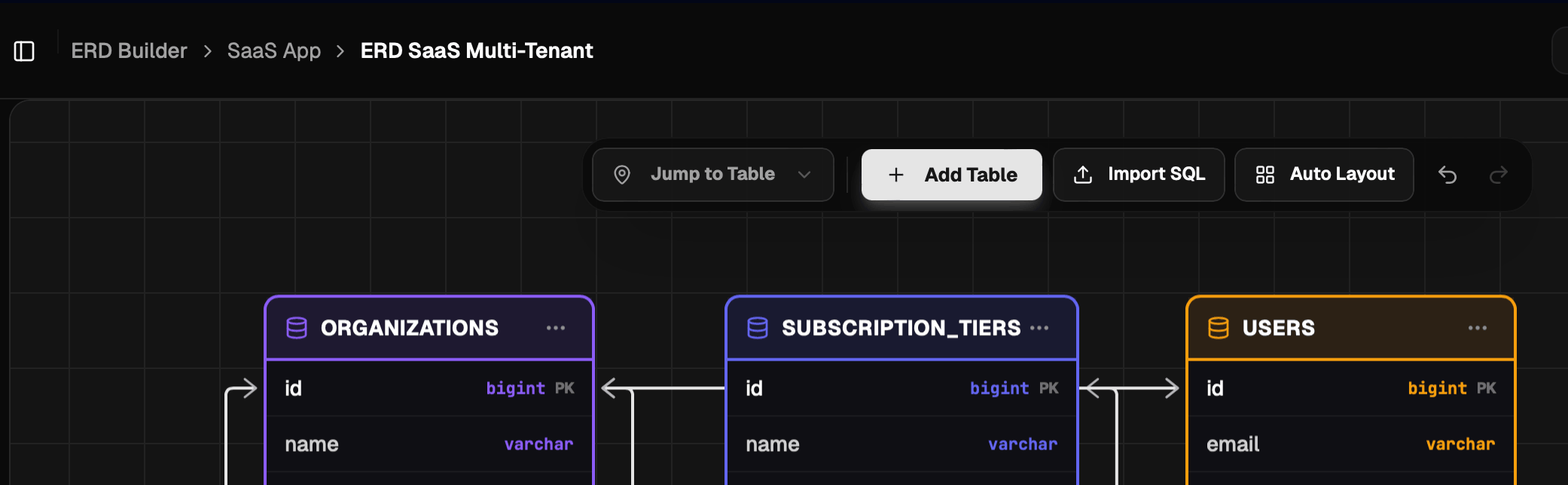
ERD Builder is a core feature that allows you to visually design database schemas with a drag-and-drop interface.
How to Create a Table
- Click the "Add Table" button on the toolbar.
- Enter the table name (example:
users). - Click the "+" icon on the table to add a new column.
Configuring Columns
Each column supports various properties:
- Primary Key (PK): Unique row identifier.
- Data Type: Choose the data type that matches your database needs.
- Constraints: Such as
not null,unique, ordefault value.
Supported Data Types
ERD Builder Pro supports a variety of standard MySQL and PostgreSQL data types. The table below shows the data type categories and their database system support:
| Category | Data Type | Database |
|---|---|---|
| Numeric | INT, BIGINT, SMALLINT, TINYINT, MEDIUMINT, DECIMAL, NUMERIC, FLOAT, DOUBLE, REAL | MySQL / PostgreSQL |
INTEGER, SERIAL, BIGSERIAL, SMALLSERIAL, MONEY | PostgreSQL | |
| String | VARCHAR, CHAR, TEXT | MySQL / PostgreSQL |
TINYTEXT, MEDIUMTEXT, LONGTEXT | MySQL | |
| Date & Time | DATE, TIME, DATETIME, TIMESTAMP, YEAR | MySQL / PostgreSQL |
TIMESTAMPTZ, TIMETZ, INTERVAL | PostgreSQL | |
| Boolean | BOOLEAN | MySQL / PostgreSQL |
| Binary/Blob | BINARY, VARBINARY, BLOB, TINYBLOB, MEDIUMBLOB, LONGBLOB | MySQL |
BYTEA | PostgreSQL | |
| Identity & Special | BIT, ENUM, JSON, ULID | MySQL / PostgreSQL |
UUID, JSONB | PostgreSQL | |
| Network & Search | INET, CIDR, MACADDR, MACADDR8, TSVECTOR, TSQUERY | PostgreSQL |
Creating Relationships
To create relationships between tables (Foreign Key):
- Point your cursor to the handle (white dot) next to the column.
- Click and drag a line to the column in the target table.
- You can set the relationship type (one-to-one, one-to-many) through that connector line.
Auto Layout
If your diagram starts to look cluttered or tables overlap each other, you can use the Auto Layout feature:
- Click the "Auto Layout" icon (grid/layout icon) on the toolbar.
- The system will automatically calculate the optimal position for each table based on existing relationships to minimize intersecting lines (edge crossing).
Editing with DBML
In addition to the visual drag-and-drop interface, you can also define database schemas using DBML (Database Markup Language) — a concise text-based markup language.
- Click the DBML Editor button (the
</>icon) on the toolbar in the top-right corner of the canvas. - The editor panel appears on the right — type DBML syntax and the diagram updates automatically.
- Changes are bidirectional: edits on the canvas update the DBML text, and vice versa.
Example:
Table users {
  id integer [pk, increment]
  name varchar [not null]
  email varchar [unique]
}

Ref: posts.user_id > users.id
[!NOTE] See the DBML Editor page for a complete guide to DBML syntax, autocomplete, and other editor features.
Export Diagram (Experimental)
[!CAUTION] The diagram export feature to image format (PNG/SVG) or PDF is currently in Experimental stage. You may encounter slight visual differences in the exported file compared to the editor view.
To export the diagram, click the Download icon on the editor toolbar.